The Numbers Don’t Tell the Whole Story
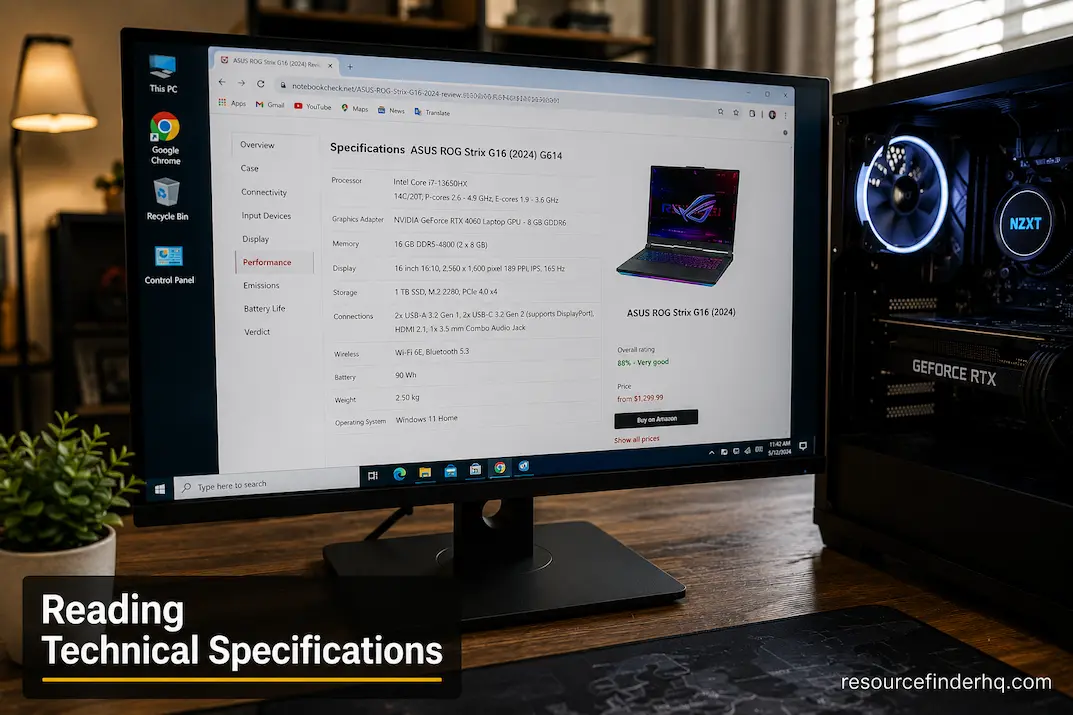
Walk into any electronics store or browse an online marketplace, and you’ll immediately notice a familiar pattern: product descriptions are packed with impressive figures. CPU speeds are measured in gigahertz (GHz), memory capacities in gigabytes (GB), storage systems boast read speeds of several gigabytes per second, and monitor refresh rates seem to climb every year.
At first, comparing computers seems simple. The higher the number, the better the performance, so the purchasing decision should be simple: just choose the highest-end configuration you can afford.
However, people often find that the actual performance does not match their expectations. A laptop with seemingly superior specifications might actually be slower than one with lower specs. Two graphics cards with the same amount of video memory can perform vastly differently. Likewise, an expensive CPU upgrade might yield only a negligible improvement in day-to-day use.
The reason is simple: technical specifications describe what a device *can* do, not what a user expects. They are useful, but only when understood in the context of actual computer usage.
Reading specifications with realistic expectations is less about memorizing technical jargon and more about understanding which data points are crucial and deserve careful consideration before making a purchase.
How Specifications Create a False Sense of Security
Specifications are designed to summarize hardware features in a standardized way. They allow manufacturers to communicate technical information efficiently and make it easier to compare products.
However, specifications also reduce highly complex systems to a set of measurable values. While this is a simple approach, it can unintentionally lead buyers to believe that all specifications have the same impact on overall performance.
Imagine having two storage drives with the same maximum read speed. Their descriptions are virtually identical. Yet, in reality, factors such as controller design, firmware optimization, sustained performance under heavy loads, and thermal management can result in drastically different user experiences over time.
This applies to virtually all critical hardware.
A processor’s clock speed does not indicate the efficiency of its architecture in processing instructions. Memory capacity usually does not reflect latency or bandwidth. VRAM capacity does not predict rendering performance, as the actual computation is performed by the graphics processor itself.
Specifications are useful reference points, but they rarely provide the full picture. They should not be viewed as performance rankings, but rather as a starting point for asking better questions.
Beyond Individual Parameters
A common mistake when comparing hardware is looking at specifications in isolation, rather than considering them as part of the overall system.
For instance, someone buying a new laptop might focus solely on processor frequency, as it appears to be an easy parameter to compare. Another buyer might want more RAM without considering the memory requirements of the software they actually use. Some people might choose a graphics card with the most video memory. Bigger is better, right?
Such choices often overlook a crucial fact:
Any single specification parameter is only meaningful when considered alongside other needs and expected workloads. A well-balanced system generally offers a better computing experience than a system centered around a single prominent figure.
The following examples illustrate this relationship.
| Specification | What It Actually Indicates | What It Does Not Guarantee |
|---|---|---|
| Processor clock speed | Maximum operating frequency | Overall application performance |
| Memory capacity | Available working space | Faster multitasking in every situation |
| SSD read speed | Maximum data transfer capability | Faster performance in every application |
| Graphics memory | Available video memory | Higher gaming performance |
| Display refresh rate | Maximum screen update frequency | Better image quality |
Reading specifications effectively means understanding both sides of the table rather than focusing only on the left-hand column.
When Bigger Numbers Matter—and When They Don’t
Technical marketing naturally emphasizes measurable improvements because numbers are easy to compare. Yet not every increase translates into a noticeable difference during everyday computing.
Take memory as an example.
Moving from a computer with very limited memory to one with sufficient capacity often transforms system responsiveness. Applications remain open longer, multitasking becomes smoother, and the operating system spends less time moving data between memory and storage.
Once adequate memory exists for a particular workload, however, adding significantly more may produce little visible improvement.
The same pattern appears with storage performance.
Replacing a mechanical hard drive with a modern SSD creates dramatic reductions in startup and loading times because the underlying technology changes completely. Upgrading from one fast SSD to another that advertises even higher peak transfer speeds often produces much smaller differences during ordinary office work or web browsing.
This concept applies throughout computer hardware.
Performance improvements tend to be most noticeable when solving an existing limitation rather than simply increasing already sufficient specifications.
Specifications Only Become Valuable in Context
Imagine reading only the ingredient list on two different recipes without knowing what meal they are intended to create. While the ingredients provide useful information, they reveal very little about the final result.
Hardware specifications work in a similar way.
The same processor may perform exceptionally well in software development while offering only modest advantages during light office tasks. A dedicated graphics card capable of complex three-dimensional rendering might remain largely inactive throughout an entire day of document editing.
This is why experienced buyers often begin by evaluating their workloads before examining specification sheets.
Instead of asking:
“Which computer has the highest specifications?”
They ask:
“Which specifications matter most for the work I actually do?”
That shift in thinking often leads to smarter purchases and better long-term value.
Reading Processor Specifications Without Misleading Assumptions
Processor specifications contain several measurements, each describing a different characteristic rather than a single measure of speed.
Clock speed indicates how quickly processing cycles occur, but modern processors continuously adjust operating frequencies depending on workload, temperature, and available power. A higher advertised frequency therefore represents only one aspect of processor behavior.
Core count introduces another layer of complexity. Applications capable of dividing work efficiently across multiple cores often benefit from additional processing resources, whereas software performing mostly sequential tasks may rely more heavily on individual core performance.
Cache memory, manufacturing architecture, and power management further influence how efficiently processors complete real-world workloads.
Instead of comparing processors using only one specification, it is usually more informative to consider how these characteristics interact.
For practical evaluation, readers should think of processor specifications as answering different questions.
| Specification | Practical Question It Helps Answer |
|---|---|
| Clock speed | How quickly can individual tasks be processed? |
| Core count | How much work can be performed simultaneously? |
| Cache size | How efficiently can frequently used information remain available? |
| Power rating | How much heat and energy might the processor generate? |
No single value independently determines overall capability.
Understanding Memory Specifications Beyond Capacity
Memory specifications are frequently reduced to one number: total capacity.
While capacity certainly influences multitasking and application responsiveness, it represents only part of the picture.
Memory also differs in operating speed, latency, channel configuration, and compatibility with processor memory controllers. These characteristics influence how efficiently information moves throughout the system.
For everyday users, however, practical expectations remain important.
Doubling memory capacity does not necessarily cut application loading times in half. Faster memory modules may improve certain workloads while producing almost imperceptible differences in others.
The goal should not be purchasing the highest available specification but ensuring memory aligns with the software the computer is expected to run consistently.
Understanding this distinction prevents unnecessary upgrades while encouraging investments where they genuinely improve productivity.
A Better Habit Before Comparing Products
Instead of immediately comparing specification sheets side by side, take a moment to identify what the computer needs to accomplish over the next several years.
A student writing assignments, attending online classes, and conducting research has very different hardware requirements than a professional architect working with detailed three-dimensional models. Likewise, someone managing spreadsheets and email rarely benefits from the same specifications that matter to a video editor producing high-resolution content.
Once the intended workload becomes clear, specification sheets become far easier to interpret because every number can be evaluated according to a practical purpose rather than marketing appeal.
In many cases, the smartest buying decision comes not from choosing the computer with the largest numbers, but from recognizing which specifications will actually influence the work performed every day.
The Most Overlooked Question Before Buying Hardware
Many purchasing decisions begin with a comparison website or an online marketplace where products are sorted by price or specifications. While this approach is convenient, it often skips the most important question:
What problem is this hardware expected to solve?
Without answering that question first, it’s easy to compare products that were never designed for the same purpose.
For instance, someone upgrading a computer because web pages load slowly might immediately start comparing processors. However, if the existing system still uses an older hard drive or frequently runs out of available memory, replacing the processor may do little to improve the overall experience.
Likewise, a professional video editor may notice long export times and assume a faster storage drive is needed, when the real limitation lies in processor performance or available graphics acceleration.
Understanding the reason behind an upgrade changes how to interpret every specification. Instead of asking whether one component has better numbers than another, the focus shifts toward identifying which specification directly addresses the existing limitation.
Reading Specifications Like a Problem Solver
Experienced technicians rarely evaluate hardware by reading specifications from top to bottom. Instead, they work backward from the intended task.
Consider the difference between these two approaches.
A specification-focused approach
- Compare processor clock speeds.
- Compare memory capacities.
- Compare storage sizes.
- Compare graphics memory.
- Choose the product with the highest numbers.
A workload-focused approach
- Identify the software that will be used most often.
- Determine which hardware resources that software depends on.
- Compare only the specifications that influence those tasks.
- Ignore specifications that provide little practical benefit.
The second method usually leads to more balanced purchasing decisions because it connects hardware directly to real-world usage instead of treating every specification as equally valuable.
Some Specifications Describe Capability, Others Describe Limits
Another useful way to interpret specification sheets is to recognize that not every figure represents performance.
Some values describe what a component can achieve, while others define the boundaries within which it operates.
Consider the following examples.
| Specification | What It Primarily Describes |
|---|---|
| Maximum processor boost frequency | Potential peak operating speed |
| Supported memory capacity | Maximum amount of RAM the platform can use |
| PCI Express version | Available communication bandwidth |
| Thermal Design Power (TDP) | Expected heat and power characteristics |
| Maximum display resolution | Highest supported visual output |
Reading these values without understanding their purpose often leads to incorrect assumptions.
For example, a processor capable of reaching a high boost frequency does not remain at that speed continuously. Likewise, support for very large amounts of memory doesn’t mean every workload requires that much RAM.
Understanding the role of each specification prevents unrealistic expectations before hardware is even installed.
Marketing Language Often Emphasizes the Best-Case Scenario
Specification sheets themselves are usually factual. Marketing material surrounding those specifications, however, naturally highlights the most impressive outcomes.
Words such as ultra-fast, next-generation, professional-grade, or AI-powered attract attention, but they rarely explain under what conditions those advantages become meaningful.
For example, a storage drive may advertise exceptional sequential transfer speeds. Those figures are often measured under carefully controlled testing conditions using ideal workloads. Everyday activities such as opening documents, launching productivity software, or browsing the internet may never approach those maximum values.
Similarly, a monitor advertised with an extremely high refresh rate may benefit competitive gaming, yet provide only modest advantages during spreadsheet work or general office use.
Rather than dismissing marketing entirely, it helps to ask a simple follow-up question:
Under what type of workload will this specification actually make a noticeable difference?
That question often reveals whether a feature represents practical value or simply theoretical capability.
Building a Practical Evaluation Checklist
Instead of relying on specifications alone, use a structured evaluation process before making a purchasing decision.
Step 1: Define the Primary Workload
Write down the three tasks the computer performs most frequently.
Examples might include:
- Software development
- Graphic design
- Video editing
- Office productivity
- Online learning
- Engineering applications
- Gaming
This immediately narrows which specifications deserve the closest attention.
Step 2: Identify Performance Priorities
Ask which resource those tasks depend upon most.
For example:
| If Your Work Mostly Involves… | Pay Closest Attention To… |
|---|---|
| Running many applications simultaneously | Memory capacity |
| Processing complex calculations | Processor performance |
| Editing large media projects | Storage speed and memory |
| Real-time 3D graphics | Graphics processor |
| Everyday productivity | Overall system balance |
Notice that no single specification appears as the correct answer for every workload.
Step 3: Evaluate the Entire Platform
Before finalizing a purchase, consider questions that specification sheets don’t always answer directly.
- Can this system be upgraded later?
- Does the cooling solution support sustained workloads?
- Is the power supply appropriate for future expansion?
- Will the motherboard support newer hardware generations?
- Are connectivity options sufficient for future peripherals?
These practical considerations often influence long-term satisfaction more than small differences between benchmark numbers.
A Realistic Example of Reading Specifications
Imagine two desktop computers priced similarly.
Computer A
- Faster processor
- 16 GB memory
- Mid-range graphics card
- Standard cooling
Computer B
- Slightly slower processor
- 32 GB memory
- Similar graphics card
- Better cooling system
- Larger SSD
Neither computer is objectively “better.”
For someone editing large multimedia projects, Computer B may provide a smoother experience because larger memory capacity, improved thermal performance, and additional storage support prolonged workloads more effectively.
For software focused primarily on processor-intensive calculations, Computer A could complete certain tasks more quickly despite having less memory.
The lesson isn’t which computer to buy.
The lesson is that specifications gain meaning only after understanding how the computer will be used.
Technical Literacy is More Important Than Memorizing Specifications
Technology is constantly evolving.
Processors are continuously being upgraded.
Memory performance is constantly improving.
Storage interfaces are continually being enhanced.
Graphics architecture is constantly changing.
Hardware evolves so rapidly that today’s specifications may not be very relevant in the future.
However, regardless of how technology evolves, understanding specifications remains extremely useful.
If you understand how workloads align with hardware requirements, you can evaluate new products with confidence, even without knowing what future specifications will look like.
This skill is far more valuable than memorizing model numbers or benchmark scores.
Closing Perspective
Reading technical specifications isn’t about finding the highest numbers or assuming that every upgrade guarantees a better computing experience. Specifications are tools for understanding a device’s performance, but their true significance only becomes clear through actual use.
Savvy buyers look beyond the marketing hype and ask more profound questions. Which components have the most impact on my daily work? Which features address the specific problems I need to solve? Which capabilities meet my current needs while also allowing for future requirements?
This approach to interpreting specification sheets transforms them into a valuable resource for decision-making, rather than just a list of technical data. Our goal isn’t to become experts in every hardware technology, but to gain the confidence to evaluate which specifications truly matter and which ones merely look good on paper.
Frequently Asked Questions
1. Why do two laptops with similar specifications sometimes feel different to use?
Performance > Rated specifications. Factors such as storage controllers, thermal efficiency, firmware optimization, memory configuration, and software optimization all influence the overall user experience.
2. Can we trust the manufacturer’s specifications?
Generally, yes. Technical specifications usually describe the hardware accurately. It is important to understand what these specifications mean in practice, rather than viewing them as performance guarantees.
3. Should I look at benchmark scores or the specification sheet first?
Determine your workload first. Once you understand which performance aspects are truly important for your work, benchmarks and specifications become more useful.
4. Is it worth paying more for higher specifications if I mainly use my computer for everyday productivity?
Not necessarily. If you rarely push the hardware during your daily tasks, paying for features you never use may not offer any real benefit.
5. What are the most common mistakes people make when reading technical specifications?
Attributing equal importance to all specifications. The value of a specification depends on how well it aligns with the software and workloads the machine will run.
6. How can I improve my hardware evaluation skills?
Instead of memorizing specification numbers, try to understand the relationship between workloads and the hardware required to run them. This strategy remains effective as technology evolves.